Introduction
Have you ever received an email that looked genuine—but turned out to be fake? Maybe it claimed to be from your bank, your company, or even your own email address. This is exactly how cyber attackers exploit weak email security.
Email remains one of the most common entry points for phishing, spoofing, and fraud attacks. Without proper protection, anyone can send emails pretending to be you or your organization.
This is where SPF, DKIM, and DMARC come into play.
These three technologies work together to:
- Verify sender authenticity
- Prevent email spoofing
- Improve email deliverability
In this guide, we’ll break everything down in a simple and practical way so you can understand and implement email security effectively.
📧 What Is Email Authentication and Why It Matters
Email authentication is a set of technical methods used to verify that an email truly comes from the domain it claims to be from. In simple terms, it helps receiving mail servers confirm that the sender is genuine—not a scammer or attacker pretending to be you.
When you send an email, authentication protocols check whether:
- The sender is authorized to use that domain
- The message has not been altered during delivery
- The email follows security policies set by the domain owner
Why Email Authentication Matters
For businesses, marketers, and website owners, email authentication plays a critical role in both security and performance.
✅ Builds Brand Trust
When your emails are properly authenticated, recipients can feel confident that the message is genuinely from your organization. This increases the chances that users will open, read, and engage with your emails without hesitation.
📥 Improves Email Deliverability
Email providers prioritize security. Authenticated emails are more likely to:
- Reach the inbox instead of spam
- Avoid being flagged as suspicious
- Maintain a strong sender reputation
🛡️ Protects Your Domain Reputation
Cybercriminals often try to misuse domains to send fake emails. Email authentication helps prevent this by ensuring that only authorized sources can send emails on your behalf.
This protects:
- Your customers from fraud
- Your brand from misuse
- Your domain from being blacklisted
What is Email Security (SPF, DKIM, and DMARC)?
Email security refers to the methods used to protect email communication from unauthorized access, spoofing, and phishing attacks.
SPF, DKIM, and DMARC are three core authentication mechanisms:
✅ SPF (Sender Policy Framework)
- Verifies which servers are allowed to send emails on behalf of your domain.
- Helps prevent unauthorized senders.
✅ DKIM (DomainKeys Identified Mail)
- Adds a digital signature to your email.
- Ensures that the email content hasn’t been altered.
✅DMARC (Domain-based Message Authentication, Reporting & Conformance)
- Builds on SPF and DKIM.
- Tells receiving servers what to do if authentication fails (none, quarantine, reject).
What is SPF, DKIM, and DMARC?
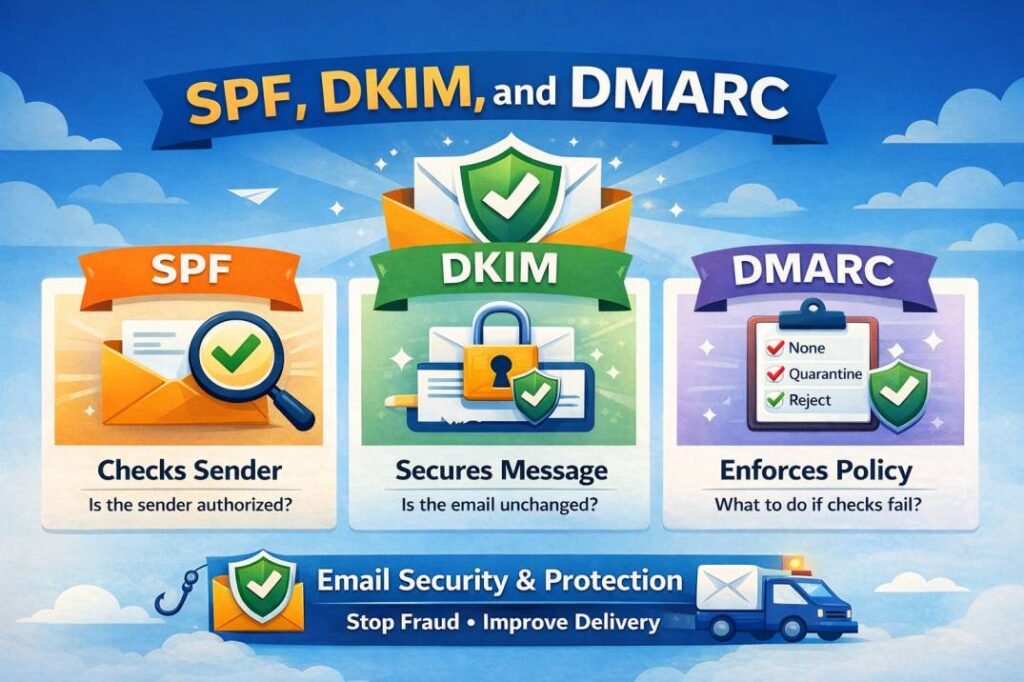
SPF, DKIM, and DMARC are email authentication methods that help verify sender identity and protect emails from fraud.
- SPF → Checks if the sender is authorized
- DKIM → Ensures the email is not altered
- DMARC → Decides what to do if checks fail
Step-by-Step Guide to Setup SPF, DKIM, and DMARC
Setting up SPF, DKIM, and DMARC may sound technical, but if you follow these steps carefully, you can secure your domain easily.
🛠️ Step 1: Set Up SPF (Sender Policy Framework)
SPF defines which servers are allowed to send emails from your domain.
How to Configure SPF:
- Login to your DNS provider (Hostinger, GoDaddy, Cloudflare, etc.)
- Go to DNS / Zone Editor
- Add a new TXT record
Example SPF Record:
Explanation:
v=spf1→ SPF versioninclude:_spf.google.com→ Allow Google servers~all→ Soft fail for others
🛠️ Step 2: Configure DKIM (DomainKeys Identified Mail)
DKIM adds a digital signature to your emails to ensure they are not modified.
How to Configure DKIM:
1. Go to your email provider dashboard.
2. Find DKIM settings
3. Generate DKIM keys (public + private)
4. Add a TXT record in DNS
Example DKIM Record:
🛠️ Step 3: Set Up DMARC
DMARC tells receiving servers what to do if SPF or DKIM fails.
How to Configure DMARC:
1. Go to your DNS settings
2. Add a new TXT record
Host:
Value:
Policy Options:
p=none→ Monitor onlyp=quarantine→ Send to spamp=reject→ Block completely
Real-World Use Cases of SPF, DKIM, and DMARC
1. Business Email Protection
A company uses SPF, DKIM, and DMARC to ensure that only its official mail servers can send emails.
Scenario:
Without authentication, a hacker could send fake emails like:
- “Urgent: Payment Required”
- “Invoice Attached – Please Review”
With proper setup:
- Unauthorized emails are blocked or flagged
- Customers receive only verified emails
2. E-commerce Website Security
Online stores send order confirmations, invoices, and delivery updates.
Scenario:
Attackers may try to send fake order emails to customers with malicious links.
With authentication:
- Fake emails fail SPF/DKIM checks
- DMARC can reject or send them to spam
3. Corporate Email (Gmail / Outlook Users)
Organizations using Google Workspace or Microsoft 365 rely heavily on email.
Scenario:
Employees receive emails that look like they’re from their boss.
With authentication:
- Suspicious emails are flagged
- Users see warnings like “This email may not be safe”
4. Banking & Financial Institutions
Banks handle sensitive data and must ensure high-level security.
Scenario:
Fraudsters send emails pretending to be from a bank asking for OTP or login details.
With SPF, DKIM, DMARC:
- Fake emails are rejected
- Only official emails are delivered
Common Mistakes to Avoid
❌Using multiple SPF records
✔ Always combine into one record
❌ Setting DMARC to “reject” immediately
✔ Start with “none” and monitor
❌ Forgetting DKIM setup
✔ SPF alone is not enough
❌ Not checking reports
✔ DMARC reports give valuable insights
❌ Incorrect DNS formatting
✔ Even a small error can break authentication
Conclusion
Email is still one of the most powerful communication tools—but it’s also one of the easiest to misuse if not properly secured. That’s why implementing SPF, DKIM, and DMARC is no longer optional.
These protocols work together to make sure your emails are authentic, secure, and trustworthy. They help prevent attackers from impersonating your domain, protect your users from fraud, and increase the chances that your emails actually reach the inbox.
Whether you’re running a business website, sending newsletters, or managing professional communication, setting up proper email authentication gives you better control and stronger protection.
In simple terms, a secure email setup not only keeps threats away—it also builds long-term trust with your audience.